
Resizing text area (message area) of Contact Form 7 can be managed in 2 ways. If your only problem is how to fit the size when you put contact form in the footer, just add “x1” or “x2” to make the message text area to be 1 liner or 2.
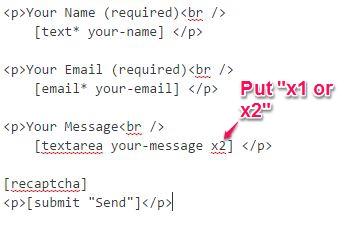
The other solution is to get your hands dirty by customizing the CSS form. There are several ways to implement this, depending on your theme. But here’s the most common implementation:
/*added to widen contact form 7 text field*/
textarea {
height: 250px;
width: 500px;
}
Again, there are still some other ways to do it. Other coder uses class or id to implement this. Do you have any problem with your Contact Fomr 7? Post a message below or send us a question.